Why Are My Google Ads Not Showing?
A woman who runs a small landscaping company sets up her first Google Ads campaign on a Monday night. Tuesday morning she types “patio installation” into Google at her kitchen table, then again on her phone in the truck. No ad. She has a budget, she has a campaign, and she has no idea whether she’s paying for anything. Why are your Google Ads not showing? One of eight things has usually stopped them: billing, a campaign that’s switched off, a disapproved ad, a budget too small for your clicks, a bid that loses the auction, targeting that leaves you out, a schedule that’s closed right now, or keywords that are too rare or blocked. And sometimes the ad is running fine, and Google has simply stopped showing it to you.
When we take over Google Ads management for a business, we check those eight things in that order, because the first ones take seconds and the last ones take thought. Every rule below comes from Google Ads Help, quoted word for word. Where something is our opinion, we say so.
Is your ad missing, or are you just not seeing it?
Stop searching for your own ad. It’s the most natural thing in the world, and it can hide the answer from you. Google says if you repeatedly look for your own ad using Google search but never click on it, you might stop seeing it entirely.
The reason: Google’s system stops showing you ads that it thinks you aren’t interested in.
So an owner who checks ten times a day can make their own ad disappear for themselves while customers still see it. Those searches can also hurt the ad. Google warns that you’ll accumulate impressions without clicks, which can lower your clickthrough rate and prevent your ad from appearing as often as it should.
Open your account and look at the Impressions column first. An impression is one time your ad was shown. If that number is climbing, your ad is running and you can relax. If you just launched, give it a few hours, because Google Ads reporting isn’t real-time.
Google says you may not see clicks and impressions you’ve received in the last three hours.
If impressions stay at zero, one of the gates below is closed.
The eight gates every ad has to clear
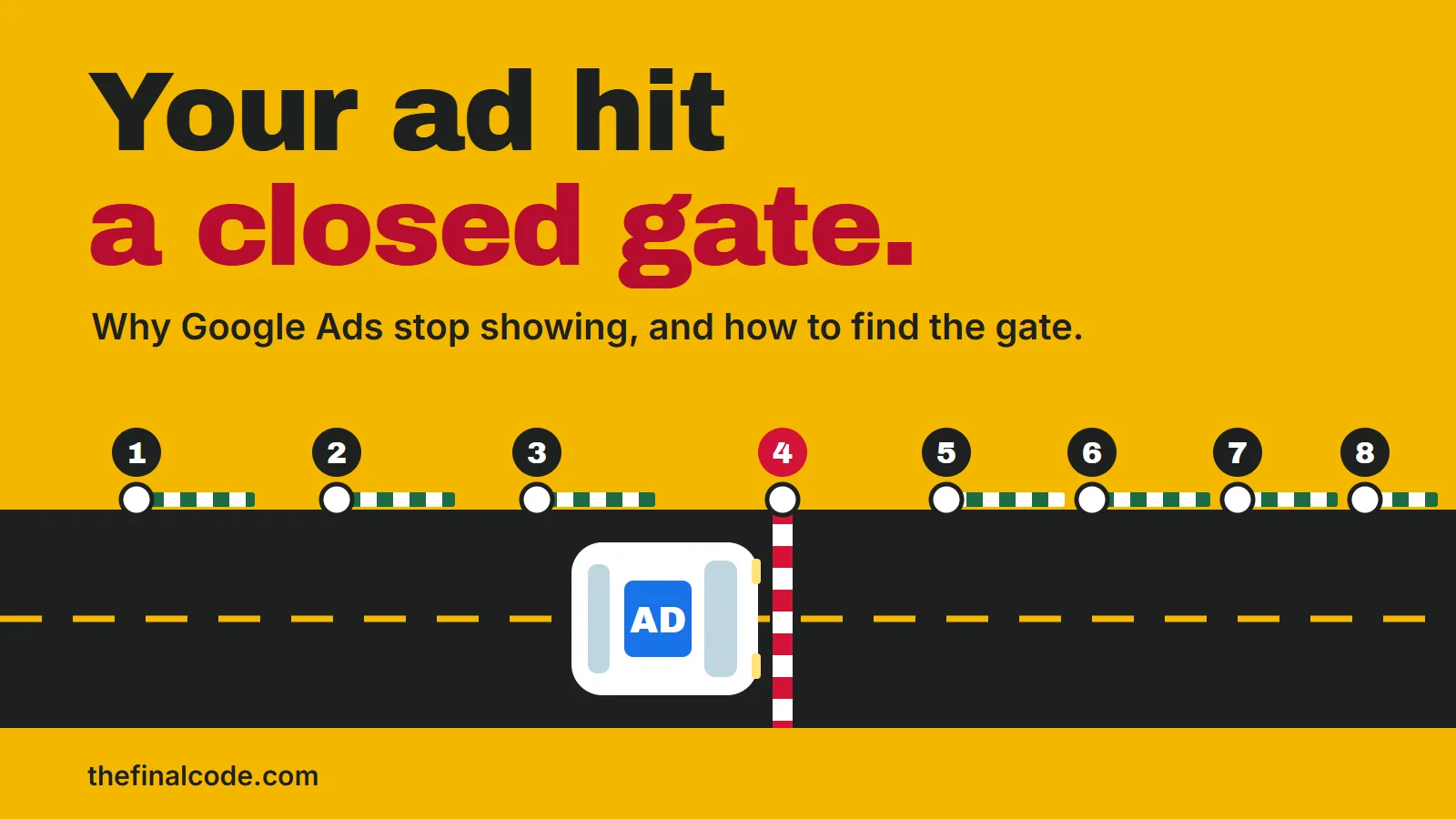
Picture your ad driving down a road toward a customer. There are eight gates on the road. If even one gate is shut, the ad stops there, so you check them one at a time until you find the closed one.
- 1. BillingCheck the Billing summary
- 2. Campaign onStatus column, Campaigns page
- 3. Ad approvedStatus column, Ads page
- 4. Budget: closedOne shut gate stops the ad right here
- 5. Bid and Ad RankKeyword status, bid strategy status
- 6. Location, languageCampaign settings
- 7. ScheduleAd schedule page
- 8. KeywordsKeyword status, negative keywords
Our drawing. The order is our recommendation. The checks come from Google Ads Help, "Why you may not see your ad."
Did a billing problem shut everything off?
Check this first, because it stops every campaign at once. Google is plain about it: Your ads will not run until your Google Ads account is active with valid billing information.
A brand new account with no payment method is the classic case. An expired card on an older account is the other one.
If a charge fails, Google says If your payments get declined, your ads might stop running until your payment goes through.
Google says some accounts keep running for a short period after a decline, so your ads may go dark a while after the card problem started. Look in the Billing summary, where Google says You can find detailed information about declined payments
, including the date, the amount and the reason if one is available. Google also points out that your credit card company or bank declines your payment, not Google.
So the fix is usually a phone call to your bank.
Once it’s fixed, add a second card. Google says Your backup payment method will only be charged if your primary payment method is declined.
That way a problem with one card doesn’t turn off your ads.
Two rarer problems look the same from the outside. Google says Ads won’t serve if your account is undergoing billing verification or has been temporarily suspended due to security concerns, like an account takeover.
If you see an alert at the top of your account, deal with that before you touch anything else.
Is the campaign actually switched on?
Every campaign has a status, and it sits in the Status column on your Campaigns page. It matters more than any other setting, because A campaign’s status affects all ad groups and ads within it.
A perfect ad inside a paused campaign shows to nobody.
- StatusGoogle's definitionYour move
- Paused
The campaign and its ads aren't running because you have paused it.
Turn it back on. - Ended
The campaign has passed its end date, so its ads are no longer running.
Change or remove the end date. - Pending
The campaign has a start date in the future, so its ads have not started running yet.
Check the start date. - Not eligible
Campaign is inactive because there are no ad groups, all ad groups are paused or deleted, all ads are paused or deleted, or all keywords paused or deleted.
Turn on or add what's missing. - Limited by budget
The campaign is active and can show ads, but not as often as it could due to budget constraints.
See the budget section below.
Source: Google Ads Help, "Campaign status: Definition." The last column is our advice.
Check one level down as well. A campaign can say Eligible while the ad group or the ad inside it is paused. Google’s own list tells you to check the ad, campaign and ad group statuses for a “Paused” or “Removed” status.
Did Google disapprove your ad?
Every new or edited ad gets reviewed. Google says Most ads are reviewed within one business day.
While that happens the status reads Under review, and every edit starts the clock over: Changes to your ad or assets restart the review process and may cause delays.
So don’t keep tweaking an ad that’s waiting. Google’s timeline is If your ad is under review for more than 2 full business days, check your ad’s status.
After that: If your ad has been under review for more than a week, contact Google Ads support for assistance.
If the status says Disapproved, the ad is off everywhere. Google’s words: A disapproved ad won’t be able to run until the policy violation is fixed and the ad is reviewed again.
To find out why, go to your Ads page and hover over the word “Disapproved” in the Status column. Then read the policy it names.
The problem isn’t always in the ad’s words. Google says The disapproval can be caused by an issue with your assets, ads, or the landing page for your ad.
Its examples are small and ordinary. One ad was flagged for using repeated punctuation or symbols in the ad headline.
Another was disapproved because your landing page has a typo in the URL you provided.
Fix the issue and save, and Your ad will automatically be reviewed again.
If you think Google got it wrong, you can appeal from inside your account.
Watch for one softer status, Eligible (limited). Google uses it for ads that comply with our policies but are limited in where and when they can show.
That can happen with alcohol, gambling, healthcare and trademark rules. Your ad runs, just not everywhere, and it may be blocked in the exact place you’re searching from.
If you sell products, you have one more place to look. Shopping ads run from the product feed in Merchant Center, so a product problem there can keep an item out of your ads even when the campaign looks healthy. That feed is one of the first things we open when we do marketing for an online store.
Is your budget too small for what a click costs?
A low budget rarely turns your ad off completely. It makes the ad show less often, which feels the same when you’re the one looking for it. Google explains what it does when your budget can’t cover the traffic: To prevent your budget from depleting too quickly, Google Ads reduces the frequency of your ad appearances.
The math is simple. Say you set $20 a day and clicks in your trade cost $10. That’s about two clicks a day, so your ad is missing from most searches by design. (Those numbers are made up to show the math. Your account shows your real click cost.) Google warns about this exact gap: If the daily budget is very low compared to your Cost-Per-Click (CPC) bids, your ads may struggle to enter auctions.
You have two honest fixes. Raise the budget, or cut the campaign down to fewer keywords so the money you have covers the searches most likely to buy. In our view the second one is usually smarter for a small business. Google’s budget simulator, in the campaigns table, shows what a different budget might get you before you spend it.
Don’t panic over one slow day, either. Google paces spending across the month, and says on some days you might not reach your average daily budget, and on others you might exceed it.
Is your bid losing the auction?
Every search runs a quick auction, and your ad has to earn a spot. Google calls the score Ad Rank. Google’s own troubleshooting page says If your ads aren’t showing, it could be due to a low Ad Rank. This can be caused by low Quality Score, insufficient bids, or restrictive targeting.
There’s a floor too: we set minimum thresholds that an ad must achieve to show.
If your ad doesn’t reach it, your ad doesn’t enter the page at all.
More money isn’t the only way past that floor. Google counts The quality of your ads and landing page
in the score. So if someone searches “patio installation,” the keyword, the ad and the page they land on should all be about patio installation. A generic homepage makes that harder.
Check your bid strategy too, because it has its own status. Google says your ads might not run well due to an “Inactive,” “Limited,” or “Misconfigured” status.
In our view, new accounts often trip here by choosing automated conversion bidding before they have any conversions to learn from. Google’s advice: For new campaigns or campaigns with limited data, “Maximize Clicks” might be a better starting point than “Maximize Conversions” or “Target CPA/ROAS”.
If your ad shows sometimes and you want to know how often, add the impression share column. Google defines it as the percentage of impressions that your ads receive compared to the total number of impressions that your ads could get.
A low number means customers are searching and your ad is missing most of those chances.
Are you standing outside your own targeting?
This one fools owners constantly. Your ad only shows to the people you picked. Google’s rule: Your ad will typically show only to people you’ve targeted, generally meaning people who are searching for your keywords in the language and location you’ve selected.
Its example: if you’re searching from a computer in San Francisco but your ad targets Los Angeles, your ad won’t appear in your search.
The same thing happens at a smaller scale. If your campaign targets the towns around your shop and you live one town over, you may never see your own ad from your couch. Open Campaign settings and read the Locations and Languages lines. Make sure the area you’re standing in is included, and make sure it isn’t on the excluded list.
A very tight area also limits how many searches you can ever appear for. If you serve a small area, paid ads shouldn’t be your only way to get found there. Local SEO puts you on the map for the same nearby customers, and those listings don’t stop when a budget runs out.
Is your ad scheduled to run right now?
New campaigns run around the clock. Google says By default, your Google Ads campaigns are set to show ads “All day.”
Someone may have changed that, though, often to match business hours. If your schedule runs 8 to 5 and you check your ad at 9 at night after dinner, you won’t find it, and nothing is wrong.
Open the Ad schedule page for the campaign and compare it with the time you’ve been checking. Google also reminds advertisers that even an open schedule needs customers: if no one searches for your keywords at the specified time or day you scheduled, your ads are not going to show.
Are your keywords too rare to trigger anything?
Go to your keywords and read the Status column. If it says Low search volume, that keyword is asleep. Google’s warning: A keyword with a low search volume will be inactive until its search traffic increases
. Owners often respond by raising the bid or rewriting the ad, and neither one helps: Low search volume status is unrelated to quality score, bid, or creatives, so editing these won’t change the status.
The usual cause is a keyword that’s too long or too specific. Google’s example of the fix is changing gardenia flower delivery in spring NYC
to gardenia delivery NYC
. You can shorten the keyword, use a broader match type, or use Keyword Planner to find the words people really type. If you’re selling something brand new that nobody searches for yet, you can also leave it alone, since Google will automatically check again in a week
.
A low count also tells you something about your market. If very few people type your service into Google, ads alone won’t fill your calendar. Those buyers may ask a friend, or ask an AI tool, which is why we’d look at AI search visibility for a business in a narrow niche.
Is a negative keyword blocking your best customers?
A negative keyword tells Google which searches to skip. Used well, it saves money. Google’s example is an optometrist who blocks “wine glasses”
so eyeglass ads don’t show to people shopping for stemware. Used carelessly, it quietly kills good traffic.
The default type is broad match, and the rule is strict: your ad won’t show if the search contains all your negative keyword terms, even if the terms are in a different order.
With a one word negative, any search containing that word is gone. Picture a plumber who blocks “free” to keep out people looking for free stuff:
- free water heaterBlocked, good
- free water heater quoteBlocked, a real buyer
- water heater quoteCan show
- water heater replacementCan show
Our example, using the negative broad match rule in Google Ads Help, "About negative keywords."
Look in two places, because negatives can live at the campaign level and at the account level. An account list reaches further than people expect: When you create your account-level list of negative keywords, it will automatically apply to all eligible search and shopping inventory in relevant campaign types.
One bad word added there can affect every Search campaign you run.
How do you find the exact reason inside your account?
Google gives you these tools for free. Use them in this order.
- Read the Status columnsCheck Campaigns, then Ad groups, Ads and Search keywords. Hover over any status for the reason. Google says the keyword status
gives possible reasons why your ads don’t show in the search results.
- Run the Ad preview and diagnosis toolClick the Tools icon, open Troubleshooting, then choose Ad preview and diagnosis. Set the location and device, and type a keyword. It beats searching yourself because
using the tool avoids accumulating ad impressions and impacting your performance statistics.
- Trust your numbers over the previewThe tool can be wrong. Google says it
simulates a search and might not reflect all real-time conditions
, and thatif ads are not showing, it does not necessarily mean the ads are not appearing at all.
If impressions are climbing, your ad is running. - Use Google's troubleshooterIf you're still stuck, Google has a step by step page called "Find out why you may not see your ad." Pick the situation that matches yours and follow the questions.
Sources: Google Ads Help, "About the Ad preview and diagnosis tool," "Find your first ads" and "Why you may not see your ad."
If someone else runs your account, you can ask them for all of this in one short email. Ask for each campaign’s status, last month’s impressions, and the reason for any ad that isn’t running. A good manager can answer the same day. If you get a vague reply about “optimizing,” that’s BSEO, and BSEO is you not knowing what you bought.
Sources: Google Ads Help, "Why you may not see your ad," "About the Ad preview and diagnosis tool," "Find your first ads," "Find out why you may not see your ad," "Resolve a declined payment in Google Ads," "Campaign status: Definition," "About the ad review process," "Fix a disapproved ad or appeal a policy decision," "Eligible (limited): Definition," "Fix 'Limited by budget' bid adjustments," "About average daily budgets," "About Ad Rank," "About impression share," "Target ads to geographic locations," "About Ad Scheduling," "Low search volume: Definition" and "About negative keywords." All checked November 22, 2026.
Send us your website and tell us what you're running. We'll tell you which gate is closed, whether your budget fits what clicks cost in your market, and what we'd fix first. No charge, and no obligation. Or call or text 805.243.8321.
Get My Free Market AssessmentAds stop the day the budget does, and SEO that keeps bringing in customers doesn’t.