What Is Performance Max in Google Ads?
A man who sells handmade leather wallets from his own website logs into Google Ads to start his first campaign. Before he can type a single keyword, Google suggests something called Performance Max. So what is Performance Max in Google Ads? It’s one campaign that spends one budget across nearly every place Google sells ads: Search, YouTube, Maps, Gmail, Discover and websites in Google’s display network. You give it a goal, a budget, your words and pictures, and for a store a product feed, and Google’s AI decides where each dollar goes. Should you use it? It can work well for an online store with clean sales tracking and real photos and video. For a small business with a small budget, no reliable conversion tracking, or a need to know exactly which searches it’s paying for, a Search campaign is usually the better first pick.
That’s the short version. When we take on Google Ads management for a business, this is one of the first calls we make, so below is the longer one: where the ads show, what you hand over, what reporting you get back, and how to tell which campaign fits you. Every rule comes from Google Ads Help, quoted word for word. Where something is our opinion, we say so.
What is Performance Max, in plain words?
Google’s own definition is one sentence: Performance Max is a goal-based campaign type that allows you to access all Google Ads inventory, including YouTube, Display, Search, Discover, Gmail, and Maps, from a single campaign.
“Goal-based” is the important part. A normal Search campaign starts with keywords: you pick the words, and your ad shows when people type them. Performance Max starts with a goal, like online sales or leads, and Google picks the searches, videos, inboxes and websites it thinks will reach that goal. Google describes the approach as keywordless targeting
, and says Instead of manual keyword management, the system uses various signals from your campaign, website, or feeds to determine when, and for which queries, your ads should be shown for optimal performance.
Google doesn’t pitch it as a replacement for Search. It says You can use Performance Max to complement your keyword-based Search campaigns
. You can run both, and we’ll come back to how they share the road.
Where do Performance Max ads actually show up?
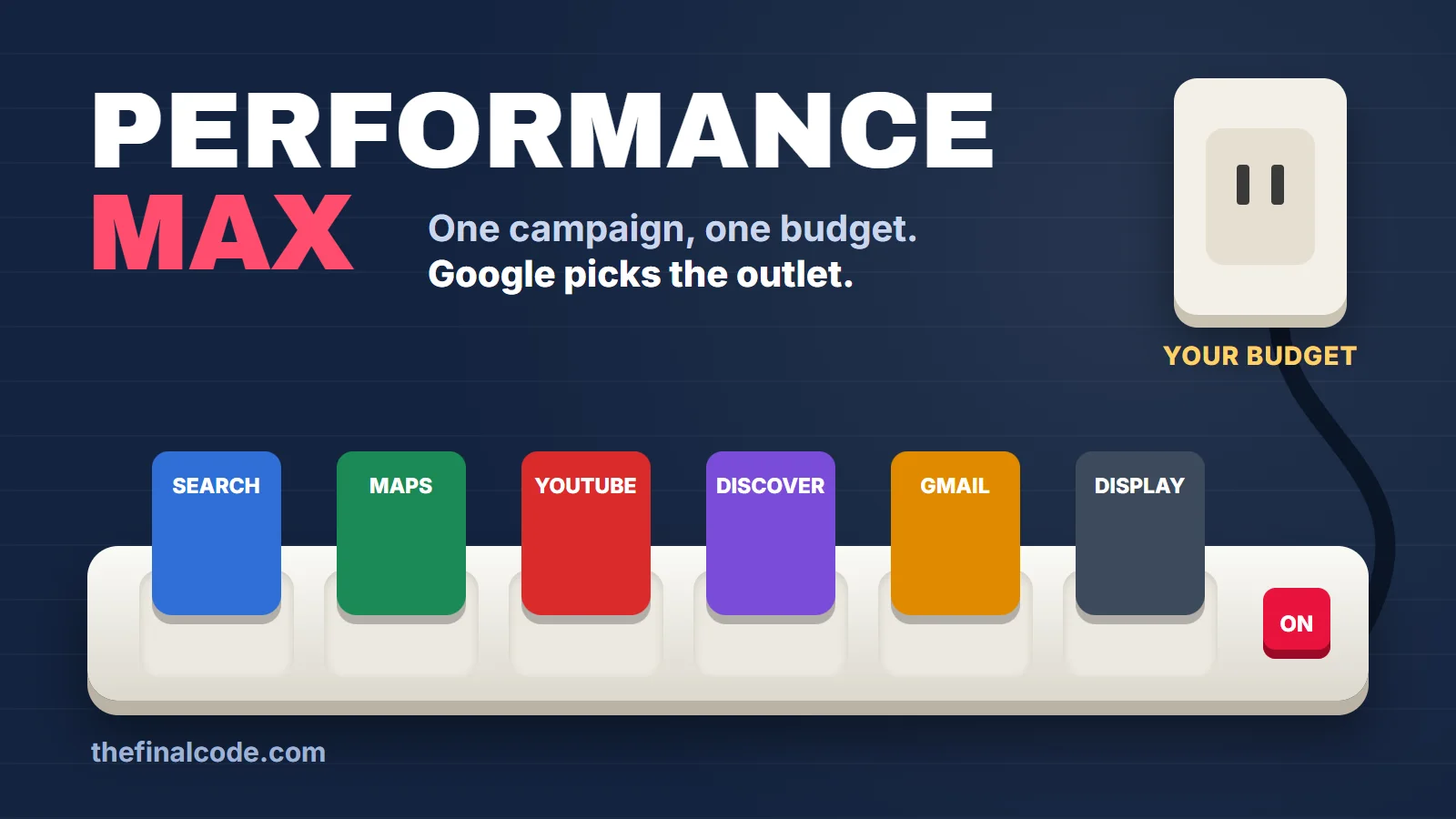
Think of your budget as one tank of water with six pipes coming off it. You fill the tank. Google opens and closes the valves.
- SearchGoogle.com, the Google app and search partner sites
- MapsGoogle Maps and Waze
- YouTubeVideo ads, plus text and image ads in YouTube
- DiscoverGoogle's Discover feed
- GmailInside people's Gmail accounts
- Display NetworkOther websites and apps
Our drawing. The six channels and what each one covers come from Google Ads Help, "About Performance Max channels."
Google spells out each pipe. The Maps channel includes ads that run on Google Maps and Waze.
The YouTube channel includes any ad that runs on YouTube, such as video and non-video ads.
The Gmail channel includes ads that run in users’ Gmail accounts.
The biggest pipe by reach is the last one: The Google Display Network channel includes ads that run on the Google Display Network, which has 35 million websites and apps.
You don’t pick the split. In Google’s words, Performance Max Automatically funnels your budget toward the highest performing inventory and placements.
If a channel gets nothing, that can be on purpose. Google says that when a channel has no issues and still isn’t showing ads, this likely indicates that your campaigns are simply bidding on channels that provide a higher return-on-investment (ROI) in that moment.
You do have some say. Google groups its own properties together and lets you treat the outside sites separately: Search partners and the Google Display Network can be configured with separate priority tiers and optional daily budget allocations.
In our view that setting is worth a look for any small budget, because the display network is where money can drift away from people who are shopping.
Maps has one more catch for a business with a shop or an office. Google’s channel report flags it when the Channel requires a location asset to show ads (Maps)
, which means linking your business location. That location usually comes from your Business Profile, the same listing that drives your free spot on the map through local SEO.
What do you hand Google before it starts?
Performance Max runs on what you give it. Google’s help page lays it out as a split: the part you build, and the part Google’s AI does with it.
- InputYou giveGoogle does
- Goal
Define what conversion actions you care about and assign an optional ROAS or CPA target.
Using Smart Bidding, real-time auctions bid based on your conversion probability.
- Creative
Provide text, images, and videos, then turn on text customization and brand guidelines.
Generative AI tools combine your assets and creatives to help generate engaging images and videos.
- Audience
Share customer intent preferences to guide learning.
Accelerates campaign learning using high-intent audiences.
- Budget
Set daily spend targets and brand safety settings, such as brand exclusions, placement exclusions, and content suitability filters.
Automatically funnels your budget toward the highest performing inventory and placements.
Source: Google Ads Help, "About Performance Max campaigns," the setup and features table. Our row labels.
Read the first row twice. The whole campaign bids on your conversion probability
, so it’s only as smart as the conversions you count. In our opinion, this is where most small accounts go wrong. If your tracking counts a page view as a “lead,” or misses half your phone calls, Performance Max will chase the wrong thing with real money, and it will do it very efficiently.
The creative list is long. Google’s best practice is to Include at least 20 text assets (15 headlines, 5 descriptions), at least 7 image assets (3 landscape, 3 square, and 1 portrait), and at least 1 video asset.
If you skip the video, Google fills the gap: If you do not upload a video, one may be generated for you from other creative
. Google itself nudges you to make your own: The use of your own video asset is particularly important if you want to minimize spend on auto-generated videos on YouTube.
A short, honest video of your product or your crew is something we build in our video marketing work, and it’s worth having before you turn this campaign on.
You can also hand over search themes, which are short phrases that tell Google what your customers type. They’re optional. Google says You can add up to 50 search themes per asset group.
What can Google change without asking you first?
More than most owners expect. Three settings matter.
Text customization writes extra headlines and descriptions for you. Google says Google AI generates headlines and descriptions from your landing page content, domain, and current ads.
Final URL expansion can send people to a different page than the one you chose: If you turn on Final URL expansion, Google may replace your Final URL with a more relevant landing page based on the user’s search query, and generate a dynamic headline and description to match your landing page content.
Google is clear about who answers for those pages and words: you remain responsible for reviewing and ensuring compliance and accuracy of landing page content, and all dynamically generated assets.
If Final URL expansion is on, block the pages that don’t sell. Google’s own suggestion for URL exclusions is to exclude non-commercial content like blog, policy, or support articles, ensuring traffic lands on relevant, product-focused pages.
In our view, an old blog post or a returns policy page should never be where a paid click lands.
What reporting do you get from Performance Max?
The fair worry with any automated campaign is money going in with no explanation coming out. Google gives you several reports to answer that. These are the four we open first.
- Channel performanceWhere your conversions came from: Search, YouTube, Maps, Gmail, Discover or the display network. Find it under Channel performance in the Campaigns menu.Google notes:
Data is available from June 6, 2025 onwards.
- Search termsThe real searches that triggered your ads, with the landing page and ad format for each. Choose "Search terms and landing pages for Performance Max" from the report menu.This is where you spot searches you'd never pay for.
- AssetsHow each headline, image and video performs, including the ones Google wrote. Find it under Assets in the Campaigns menu.Use it to replace weak pictures and lines.
- PlacementsWhere your ads served and how many impressions each place got. Find it in Report editor under Insights and reports.Google notes:
Placement reports should be used as a brand safety tool.
Sources: Google Ads Help, "About the channel performance report," "About the search terms report in Performance Max," "About asset reporting in Performance Max" and "Find or create placement reports for your Performance Max campaigns." The notes without quotation marks are our advice.
One instruction from Google changes how you read all four: Prioritize conversion data over clicks and impressions when you evaluate performance max campaign performance.
The reason is that Performance Max shows video and display ads, so clicks look different than they do in a Search campaign. Judge it by sales and real leads, not by clicks.
What you still don’t get, in our view, is the same grip a Search campaign gives you. In Search you choose each keyword and its match type, and you can see every keyword’s own cost. In Performance Max, you read the search terms report after the money is spent and then block what you don’t want.
Should an online store run Performance Max?
For a store, Performance Max is one of two ways to run Shopping ads, the ads with a product photo and price. Both read from your product feed in Google Merchant Center. Google explains that Shopping ads use your existing Merchant Center product data (not keywords) to decide how and where to show your ads.
The older choice is a standard Shopping campaign. Google publishes a table that compares the two. In our short words:
- QuestionPerformance MaxShopping campaign
- Where ads showMost Google channels, including the Shopping tab, Search, YouTube, Gmail, Maps and the display networkThe Shopping tab, Search, Google Images, and search partners if you turn them on
- BiddingOnly automated: maximize conversion value or maximize conversions, each with an optional targetAutomated choices plus Manual CPC, where you set the bid
- Ad creativeYour feed plus your text, images and videoBuilt from your feed only
- New customer goalAvailableNot listed
Source: Google Ads Help, "About Shopping ads," the table "How Performance Max campaigns differ from Shopping campaigns." Our wording of Google's rows.
If you sell on Shopify, Woo, GoDaddy, BigCommerce or PrestaShop, you can build Performance Max from inside your store. Google’s help covers all five. One Shopify rule saves headaches: The information from your Shopify account always overwrites the information in your Merchant Center account, so any updates or other changes should be made in your Shopify account only.
Our view: a store with a clean feed, working purchase tracking and some sales history already recorded is the case Performance Max was built for. A brand new store with a messy feed and no sales data is not, because the campaign has nothing to learn from yet. Getting the feed and the tracking right first is a big part of how we handle marketing for an online store.
When is a Search campaign the better pick?
Google’s own pitch for Search is short: Search campaigns are text ads on search results that let you reach people while they’re searching on Google for the products and services you offer.
And the setup: Write text ads and pick keywords.
Skip special files or assets.
No video, no image set, no feed.
This checklist is our opinion, built from running both.
- Your budget is small
- You can't yet trust your conversion tracking
- You need to know exactly which searches you pay for
- You have no good photos or video
- The account is new, with no sales or leads recorded
- Your tracking counts real sales or real leads
- You sell products with a clean Merchant Center feed
- You have real photos and a video
- You can leave it alone for at least six weeks
- Your budget can cover more than Search
Our checklist. The six week line comes from Google Ads Help, "Optimization tips for Performance Max campaign for all business types."
You don’t have to choose only one. If you run both, Google has a tie rule: Search campaigns containing an exact match keyword are prioritized to serve over Performance Max when a query hits an exact match keyword.
So your most important searches can stay in a Search campaign you control word by word, while Performance Max looks for buyers everywhere else.
If you do run it, how do you set it up right?
These five steps keep a Performance Max campaign from spending on the wrong things.
- Fix your conversion tracking firstCount purchases, real form leads and real calls. Nothing else. The campaign bids on what you count.
- Add a brand exclusion for your own nameOtherwise the campaign can collect people who were already searching for you. Google's advice:
Use brand exclusions instead of negative keywords to avoid paying for clicks on your own brand name.
- Upload your own videoA real video from your business beats one Google builds from your still images.
- Block pages that shouldn't get paid clicksUse URL exclusions for blog posts, policies and support pages if Final URL expansion is on.
- Wait six weeks, then read the reportsGoogle says
Run new campaigns for at least 6 weeks.
Then check the search terms and channel reports and cut what doesn't fit.
Sources: Google Ads Help, "About negative keywords" in Search targeting and controls for Performance Max, "Common AI-based controls combinations for Performance Max" and "Optimization tips for Performance Max campaign for all business types." The order is ours.
Go easy with negative keywords in Performance Max. Google calls them a highly restrictive control that can harm performance by preventing the AI from finding valuable traffic.
Block searches that are plainly wrong for you, and leave the rest alone long enough to see what they do.
If someone else runs your Performance Max campaign, ask them three plain things: what counts as a conversion, how much went to each channel last month, and which search terms they blocked. A good manager answers the same day. A vague answer about “letting the AI learn” is BSEO, and BSEO is you not knowing what you bought.
Sources: Google Ads Help, "About Performance Max campaigns," "How keywordless targeting works," "About Performance Max channels," "About the channel performance report," "About search themes in Performance Max campaigns," "How asset groups work," "Optimization tips for Performance Max campaign for all business types," "About text customization in Performance Max campaigns," "About the search terms report in Performance Max," "About asset reporting in Performance Max," "Find or create placement reports for your Performance Max campaigns," "About Shopping ads," "Create and manage Performance Max campaigns with Shopify, Woo, GoDaddy, BigCommerce, and PrestaShop," "Choose the right campaign type," "About negative keywords" and "Common AI-based controls combinations for Performance Max." All checked November 28, 2026.
Send us your website and tell us what you sell. We'll check your conversion tracking, tell you whether Search or Performance Max should get your first dollar, and show you what we'd set up first. No charge, and no obligation. Or call or text 805.243.8321.
Get My Free Market AssessmentEvery ad campaign stops when the budget does, and SEO that keeps bringing in customers doesn’t.