What Your SEO Report Should Actually Show You
It comes in between a parts invoice and a fuel receipt, subject line Monthly SEO Report. Nobody at the agency sat down and sent it, a piece of software mails it out on a schedule. The pages are the ones from last month with the bars a little longer, and you are four green arrows in before you notice you are nodding. We are an SEO company in Ventura County, and owners forward us these the way you hand a mechanic a noise. Here. You tell me.
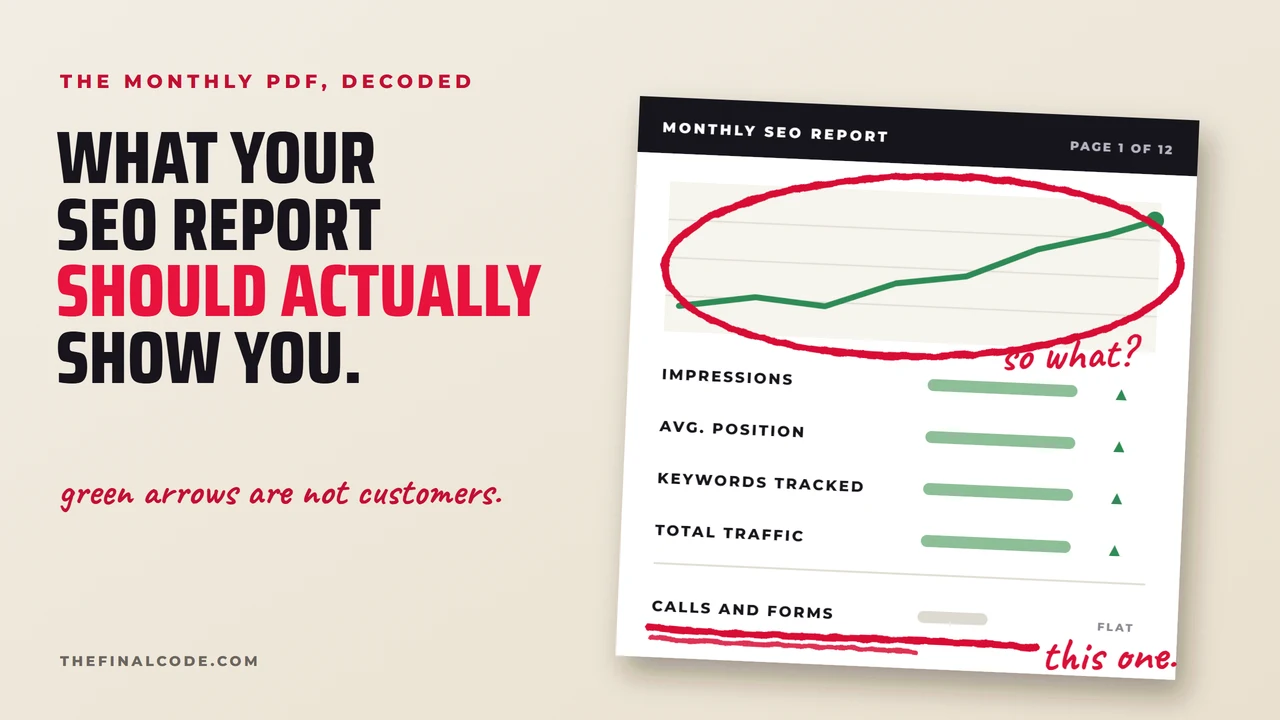
Charts up front. The page with calls and forms on it is the circled one.
Whoever built that template wanted you to open it and feel okay about paying the invoice, and it does that job well. The numbers on it are real. They are the ones Google’s free tools spit out for anybody with a login, and nobody ever asked you which ones you wanted.
Page one is built to make you nod
Pull yours up. It probably looks like this one, and the red numbers are us reading over your shoulder. None of it is made up, and that is what makes it hard to argue with. You cannot call them up and say the impressions are wrong, because they are not. What nobody has done is tell you what an impression is, and it is not what it sounds like.
- 1Google put your link on a results page more often. Including at the bottom of the page, where nobody scrolled. It still counts as an impression. Google says so itself, and we quote it further down.
- 2An average across every search you appeared for. First for your own name, nowhere for everything else, and the report prints one number and draws an arrow.
- 3The spreadsheet grew. Somebody added rows to it. Your customers did not start typing anything new.
- 4More visits, from anybody, for any reason. Your own staff checking the hours, a job seeker, and the guy who searched your name to find the number he already had.
- 5The only line you would pay for on its own, and it turns up once, as one total with no page attached to it.
Impressions, position and traffic all come out of Google’s own tools, and Google, to its credit, spells out on its own help page what the first two do and do not mean. Your vendor just did not paste that part in.
Google’s own help page warns you about two of these
Search Console is the free dashboard Google gives every website owner, and it is where these figures come from. Its help page defines an impression as “how often someone saw a link to your site on Google,” which sounds like a person looking at you. Then the same page adds this.
“In general, an impression is counted whenever an item appears in the current page of results, whether or not the item is scrolled into view.”
“The position value is a complex metric that can be misleading if you don't understand the subtleties.”
Your link can sit at the bottom of the page, below the edge of the screen, on a search somebody typed and then gave up on. Nobody laid eyes on it, and Google counts it anyway. That is how an impressions chart climbs all year while the number of people who saw your name stays where it was.
Position has a second problem. In Google’s words it is averaged “across all queries in which your property appeared.” A query is their word for a search and a property is your website, so your own name and every other search you turned up on go into the same number. It also changes with where the search was made from, which we went through in why the rankings you see are not the ones your customers see. So a single position number, with no search named and no town it was checked from, gives you nothing to act on.
Green arrows are not customers.
What each green arrow is actually counting
None of the four arrows is useless, and we look at all of them ourselves. The trouble is that none of them tells you whether the phone rang. So next to each one is what we would ask instead, if it were our money.
| What it says | Ask this instead |
|---|---|
| Impressions are up▲ | On which searches, and how many of those people clicked? |
| Average position improved▲ | Position for which term, measured from where? |
| Tracking more keywords▲ | Which of these would a customer type before calling? |
| Traffic is up▲ | How many of them called, filled in the form, or drove over? |
All four of those come down to one question, which is whether somebody landed on one of your pages and then picked up the phone. That is the line you write the check for, and on your report it is somewhere near the back, if it made it in at all.
The one page worth reading first
Back behind the charts, if you are lucky, there is a page that says how many people called or sent a form. A good report puts that page first and builds the rest around it, and your office manager can read it without ever having heard the word algorithm. It also comes out shorter than the one on your phone, because each block below stands where a chart used to be.
Calls, forms and direction requests, each one tied to the page the person was on when they did it. Set against the same month last year, too, because for a pool company January is just January, and the website did not cause it.
Which pages got written or rewritten, which links got added, and what problem each one was supposed to fix, with links so you can click through and look for yourself.
One paragraph, in words you would use, on what gets done next and which line above it should look different afterward. That paragraph is next month’s plan, and if they have a plan it will not take them long to write.
Written the way a customer types them, which is not how they read on your invoices.
Camarillo and Oxnard get different answers to the same search, and the two result pages are drawn further down.
A tracking number is how a phone call gets a page next to it
The first block is the one people push back on. “We cannot tell which page a phone call came from.” You can, and all it takes is a second phone number. A tracking number is a phone number that only appears on your website and forwards to your regular line, so when it rings you know the call came from the site. Set up properly, it can tell you which page, too. A form can record the page it was sent from the same way. If yours has been sending you impressions charts all this time and never mentioned a tracking number, ask for one.
The second block is where you find out whether anybody did anything this month. SEO is somebody sitting down and doing something to the site: writing a page, say, or fixing a link that went nowhere, and this block is where they write down what it was.
If you are still choosing who to hire, the list of things to ask is in ten questions to ask before you hire an SEO company. Anybody who can answer those straight will have no trouble sending you this kind of report.
What to ask at the next meeting, and in what order
Ask these three, and write down what comes back word for word.
- 1Which page brought the calls this month?If the answer is a total, or a long pause, nobody has put a tracking number on the site yet. Get that done before you ask for anything else.
- 2What did you change, and what did it do?You want to hear a page name and what happened to it afterward. If you get a chart instead, ask the question again.
- 3What is the one thing you are doing next month, and where will I see it?Get them to name one change and one line on that first page it should show up on. Then look at that line when the next report comes.
The reports inside our own SEO program are built the same way. Three answers and the tracking log, and the impressions chart at the back if you want it there.
Camarillo and Oxnard get two different answers from Google
The same search, run from each town on the same afternoon.
If you run a pool route or a body shop out here, a job in Camarillo and a job in Oxnard are different mornings, and Google treats them as different towns too. So before anybody touches the site, we run the same searches from each town you work and write down what each one shows. A good part of local SEO in Ventura County is that measuring.
Send us your website. We will show you where you rank today, who is outranking you on the searches that matter, and what it would take to pass them, with the name of the town each number was checked from. It is free, and it is yours to keep whether we ever talk again.
Get My Free Visibility Report Or call or text 805.243.8321